This video comes from a comment someone left on my channel on the video about the async Runtime, where a user said that if you need the response from a database or a service, there is no need to use async await and that you should not use an asynchronous method.
I replied there that this statement was not correct. On this blog I already have a few videos about async await, but today we are going deeper and looking at how it works behind the scenes, at the physical level, because it is much easier to see and understand that way.
A large part of this post is language-agnostic regardless of the programming language you use. Since this blog is about .NET, the code and the specific case use C# syntax, but the idea is the same. We are not going to talk about the .NET state machine or that of any other language, nor about how variables are placed on the heap. Instead, we are going to understand the flow that await creates from the code through the thread pool, how it interacts with the operating system, and even with the hardware of the machine.
If you have ever wondered why your API crashes with 100 users if it is "not doing anything", this post is for you.
Table of contents
1 - The cost of waiting with synchronous code
Before understanding async await, we need to understand the problem it solves.
If you have worked in .NET, you should be using async/await in every call that goes outside your service or your code, whether that is accessing the file system, the database, an external service, or anything else.
And the reason we use async await is to prevent the thread from being blocked. But what does it mean to be blocked? The best way is to see it with an example;
When we have a call to a database with the following code:
var data = repository.getByID(id);This is what happens behind the scenes:
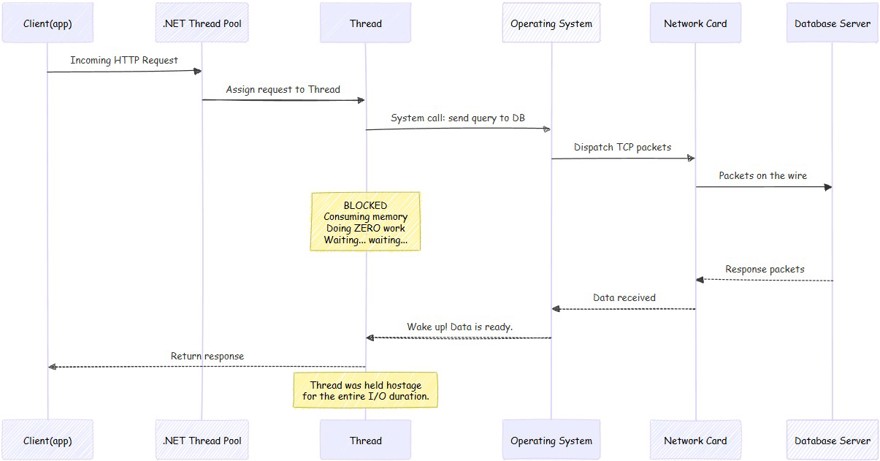
A - The .NET thread pool tells the operating system that it needs to make a call to the database.
B - The operating system is responsible for sending the information through the network card, which is what actually puts the data onto the wire.
C - We wait for the database to respond. And this can range from milliseconds to much longer waits.
D - During the waiting time, the thread responsible for making the call on your machine is not doing anything, it is simply waiting for the call to return. The thread is not only waiting, it also consumes memory.
As I always say, the big problem comes when we have a large number of requests per minute, because that is where we notice the impact the most. If you suddenly start receiving hundreds or thousands of requests per minute, it is very likely that you will end up having thread pool starvation, a topic we have already covered on this blog.
The key thing to understand here is that the CPU is waiting, doing nothing while our process is on another machine and, once it comes back to ours, it simply continues with the process.
2 - What really changes when we use asynchronous code?
Now let's see what happens when we use async/await correctly:
var data = await repository.getByID(id);
As we can see, we have simply added the await keyword to the call, and then the method itself has async Task, but the important part is await because it changes the physical side of what happens behind the scenes.
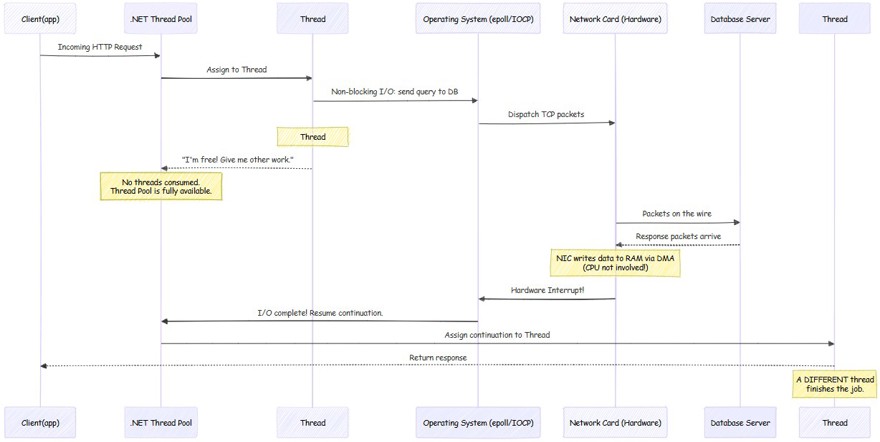
A- when using async await in .NET, the .NET runtime itself makes a non-blocking call to the operating system (Linux: epoll, Windows IOCP). This non-blocking call is a kernel-level mechanism designed exactly for this use case, where our application indicates that it wants to make a call and that it is not going to wait for the response. It is the operating system itself that has to notify the application.
B- The thread returns to the pool, and this is the essential point for understanding the difference between one approach and the other. In the previous example we saw how the thread stayed waiting; in this case we return the thread to the thread pool immediately and it is available to do any other work.
C - It is the operating system, through the network card interface, that is waiting for the call to be returned. For anyone who does not know, network interfaces (NICs) carry a small processor to perform this function. And it notifies the operating system through a hardware interrupt (wikipedia: https://en.wikipedia.org/wiki/Interrupt) that the I/O operation has been completed. Finally, the operating system notifies the .NET runtime.
D - All of this is possible because the .NET thread pool has threads of its own that monitor these notifications. When it receives the notification from the operating system, the .NET runtime takes any thread from the thread pool to continue with the process; it does not have to be the same one.
Now that you can see the physical difference between using asynchronous methods or not, you can understand how important it is to use them correctly. Because if we take an extreme case where the database takes 1 second to respond, in the first example we have a thread stopped doing nothing for one second, whereas by using async await during the waiting time, the thread can perform other tasks.
3 - Hardware as the bottleneck
As a general rule, we usually have the biggest problems or blocks because of hardware, specifically the CPU. The CPU determines how many threads can run at the same time, determined by how many cores that CPU has.
Careful, this does not mean that you can only have a single thread. An application can create threads, but only one of them (in the case of 1 vCPU) will be executed simultaneously on the CPU.
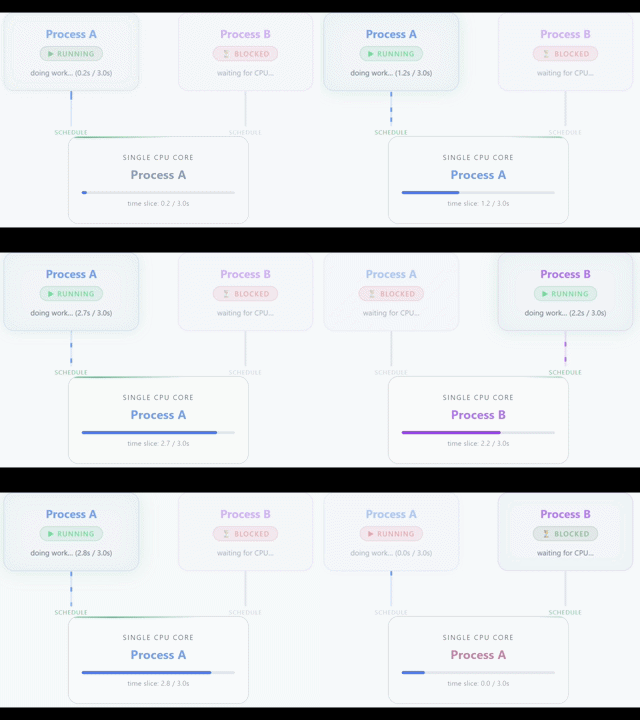
The rest of the threads will be waiting until the CPU is free. With 1 vCPU you can have the feeling of simultaneous work because the CPU switches between threads in a very fast and efficient way, but in reality it is only an illusion.
If what you are looking for is parallelism, what you need is 2 vCPU (or more), which means that 2 threads can perform tasks on the CPU simultaneously.
3.1 - Blocking on small machines
Here you have to keep in mind that more threads does not mean more computing power. Adding threads does not create additional processing out of nowhere, it simply creates more threads that will be competing for a finite number of CPUs.
Let's use the example of an API: we receive a request and we need to query the database or an external service. The thread makes the call and from that moment on, it stops doing useful work. But it still exists, which means it takes up memory and occupies a slot in the thread pool. It is simply waiting, consuming resources that could be used by other requests.
That is why using async/await or asynchronous programming in your programming language matters so much. Because it prevents us from having threads sitting there wasting hardware and operating system resources during the wait.
The vast majority of thread pool starvation problems you are going to run into are very difficult to detect and even to debug, because you need a very high request load and to know what might be happening.
4 - The $5 VPS paradox
All developers, myself included, have a ton of apps on GitHub. One way to bring them to life is with a VPS, where we can get them from $5 a month for 1 vCPU, although I personally recommend 2 vCPU to host all your applications.
Link to a cheap VPS with a 10% discount using the code NETMENTOR
And with this $5 VPS that has 1 or 2 vCPU we are able to run Docker, multiple applications, one or more databases, and also receive thousands of recurring daily users without everything collapsing. How is this possible?
The answer is simple, the vast majority of the work is not heavy CPU work, it is waiting.
Let's use my blog as an example. When a user requests a page, what does the system do? Parse the HTTP request, run some logic and validations, call the database, and transform the object into the DTO that will be returned to the interface.
Except for the database work, the rest of the actions happen in microseconds. If the call takes 200 ms from the user's point of view, the reality is that this is not 200 ms of CPU time, but rather that the vast majority is waiting time, whether for the database engine or another call to an external service.
Now processor speed comes into play, or Gigahertz (GHz). The more GHz, the more clock cycles per second we can perform. A fairly standard processor in an average VPS is going to be around 2 or 2.5 GHz. This means it will process 2.5 billion clock cycles every second, which in practice is enough for an enormous number of processed instructions.
So that is why, for low traffic levels, 1 or 2 vCPU is enough, although I recommend 2 for any developer who has several hobby apps, because even if we have some blocking, it happens so fast that it goes unnoticed by our users.
In enterprise applications, with paying customers, obviously we will need to scale, have replicas, and apply the best possible practices so that our users are not affected by blocking.
If you want to learn more about scaling and replicas, you can see it in my distributed systems book.