At this point, everyone knows what happened with Anthropic and Claude Code. That they had a leak, possibly, well actually definitely, by accident, of the Claude Code CLI.
For anyone who is not up to date, through a forgotten source map in the npm registry, more than half a million lines of code were exposed.
A lot of people are pointing to the fact that BUN has a bug that does exactly that, which was reported almost a month ago and still has not been fixed. So it could be that, or it could be any other reason, we will never know, but the rumor is there.
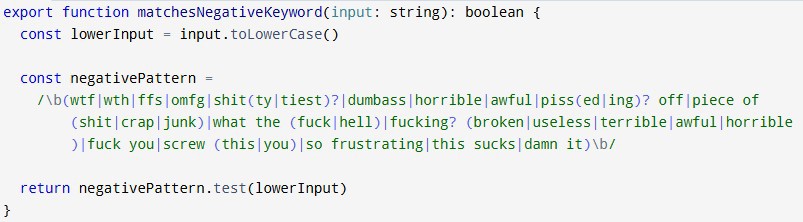
But in this post we are not going to talk about that, about the DMCAs Anthropic is sending to everyone who forks or shares the code, whether on GitHub or in video format, nor about the regex from hell used to detect whether you are in a bad mood.
What we are going to talk about is the general architecture behind Claude Code and how it works. I did not extract this information directly myself, I took it from the website ccunpacked.dev. There you can access not only the high level view but also the code itself, since they have it linked to GitHub.
Table of contents
1 - Explanation of Claude Code's agent loop
The agent loop is the main engine of the CLI, it is what happens between the moment you type a message, get the response, and type again. All of this logic happens inside a single loop and is divided into 11 steps, which are very well explained on the website.
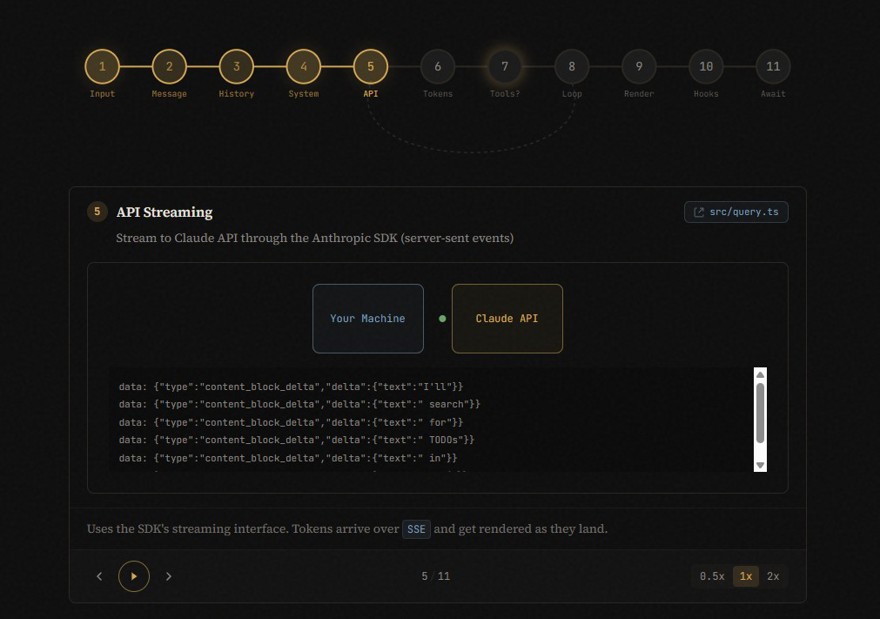
- Input: No mystery here, it is the input you type into the terminal.
- Message: The text is turned into a Message object with its own structure and the necessary metadata added.
- History: The message is added to the existing conversation history, which means Claude Code keeps the history in memory.
- System prompt: this is where the huge system prompt is built, with all the base instructions from Anthropic, including security topics and checks so the LLM does not get out of hand with what you ask for. ETC. It also attaches all the tools it has, the memory, and the context. In my opinion, this is the reason Claude is so expensive and the reason why a simple Hello in the CLI costs two dollars.
- API calls: The payload is built and the API call is sent. Then, using server-side events, the API returns everything token by token in real time. At this point we enter a loop where the following steps take place;
- Response parsing: as the tokens arrive from the API, they are rendered to be shown in the terminal.
- Tools: This is where agentic mode comes in. If there are calls to any of the system tools, the loop pauses, executes the tool, and receives the result.
- Loop check: If the task is not finished, or there are tools that have not completed, we go back to step 5 (send to the API) until Claude indicates that it is done.
- Rendering: Using markdown formatting, the response is displayed in the terminal.
- Hooks: once the process finishes, it uses this layer to check whether any action needs to be taken, such as a
/compactif your context starts becoming too large or the Kairos mode that we will talk about later. - Wait: At this point, all Claude Code can do is wait for the user's next input to return to step 1.
2 - Claude Code tools
In addition to the agent loop, we can identify the different system tools and commands, which are divided into two sections
2.1 - Claude Code commands
These commands are the ones you use inside the Claude Code terminal itself. When you type /name in the CLI window, these are the actions you can perform, and they can range from configuring the agent to launching complete workflows such as /plan, for example.
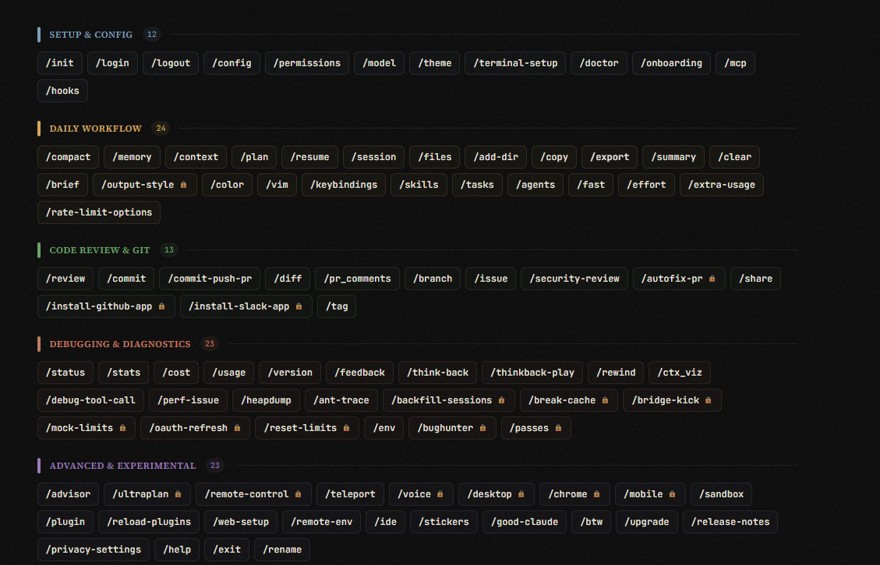
These are mainly divided into 5 categories:
- Setup & config: commands to start sessions, configure the agent, and in general the Claude Code environment.
- Daily workflow: Commands for the daily tasks Claude will need to do internally, context management, planning, memory, etc.
- Code Review & Git: It is clear that Claude is focusing on developers, and this makes that obvious, because these are all commands specialized in Git integration.
- Debugging and diagnostics: these commands are all for the state of the tool itself, performance, token cost, etc.
- Advanced & Experimental: as the name suggests, advanced and experimental tools.
2.2 - Claude Code system tools
The tools are the functions Claude calls automatically when it needs to act outside Claude Code itself or outside the API. These are tasks such as reading your files, running commands on your machine, reading a web page, etc.
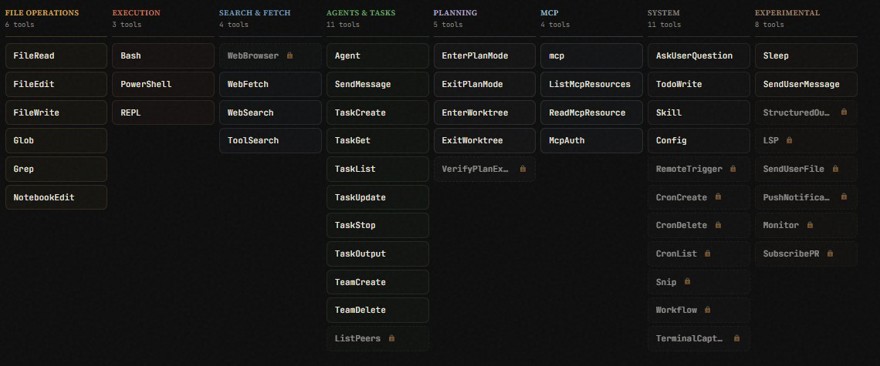
The system has 52 tools organized into 7 categories:
- File operations: Tools for reading, editing, writing, or manipulating files and directories on the local machine.
- Execution: Tools for running commands in the terminal and executing code safely.
- Search & fetch: Tools for searching the internet, reading website content, etc.
- Agents & Tasks: Tools for creating, managing, and communicating with sub-agents.
- Planning: tools for everything related to plan mode.
- MCP: tools for working with MCPs
- (and 8) System and experimental: system tools such as skills, settings, to-dos, etc.
As you can see, there is a key difference between tools and commands, and that is that commands are basically keyboard shortcuts for the user, while tools are the actions the model can invoke autonomously.
2.3 - Hidden features in Claude Code CLI
You may have noticed in the images from the previous sections that many are marked with a lock 🔒, that is because they are blocked or in an experimental phase.
And speaking of blocked things, we also have hidden features that have not been released but are locked:
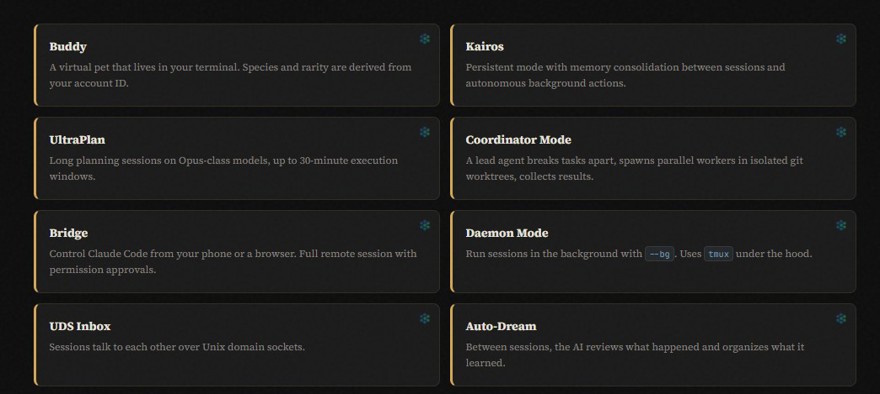
- Buddy: A virtual pet that appears in the terminal and whose personality/rarity changes depending on your account ID.
- Kairos: Persistent mode with long-term memory that keeps context across different sessions.
- UltraPlan: Ultra-long planning system that allows the agent to think for up to 30 minutes.
- Coordinator Mode: Multi-agent mode where a lead agent splits complex tasks and delegates them to multiple workers.
- Bridge: Mode that lets you control Claude Code from your phone or a browser.
- Daemon Mode: Daemon mode that runs the agent in the background as if it were another service on the computer.
- Auto-Dream: Automatically reviews past sessions and consolidates learnings while you are away.
3- Memory and context management in Claude Code
While researching for this content, I found the Kubesimplify blog, where among other things they talk about memory and context management. And obviously this is very important, since memory and context management is where most of the cost goes. Better management means lower cost, so I think it is worth including.
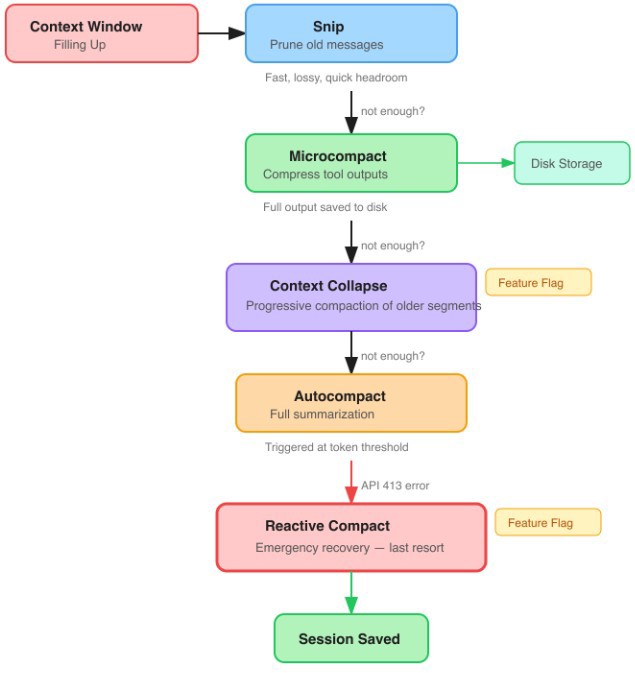
Source: https://blog.kubesimplify.com/claude-code-leak-what-the-source-actually-teaches
The process is divided into the following:
- Snip: Fast function that trims old messages to free up space immediately.
- Microcompact: When it reads a file and it is very large, instead of filling the context with the file itself, it stores the reading on disk and only passes the summary and reference to the model.
- Context Collapse: compresses segments of older conversations, in theory progressively and without affecting recent context.
- Autocompact: This function is the one executed in the hook step we mentioned earlier, and it compresses conversations when certain limits are exceeded.
- Reactive Compact: If the API returns a bulk load error (413), it aggressively compacts everything to prevent the session from dying.
4 - Conclusion
We all know that Anthropic has been making the vast majority of its code over the last few months purely with AI, and they keep having service failures, not just them, but also GitHub and a lot of companies. GitHub in particular has dropped below 89.99% uptime, which is crazy.
It is obvious that AI is a force multiplier, I do not think anyone still has doubts about that at this point, but it also amplifies failures. For many people that is not a problem, but there are environments and domains where a failure can mean real long-term problems, so avoiding them is more important than shipping 10 times more code.
Really, I just wanted to remind everyone that using AI is great, but before you commit the code, make sure you read it and are able to understand it.
Comments