When working with git there are several strategies we can follow. Each one has its pros and cons, and today we are going to look at the two most popular ones: Git Flow and GitHub Flow.
Table of contents
1 - What is GitFlow?
Git Flow is a branching strategy that consists of having your git repository with the main branch. This main branch is the primary branch.
In addition we have another branch, which is development (or dev), and this is where developers create their branches from. These branches are usually the tickets from whatever ticketing system you use. When you finish, you merge from your task branch, usually called feature, into the dev branch.
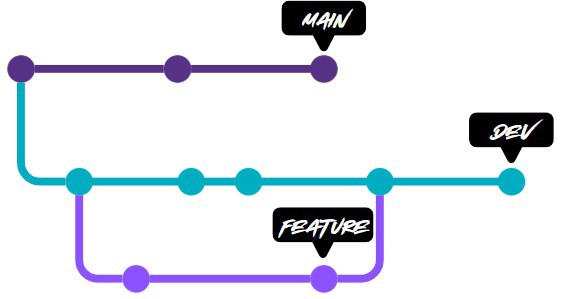
The idea of this development branch is that other teams or members can keep implementing their features and merging into the development branch.
Then, at some point, you want to deploy the features to production, and for that we have another type of branch, which we call release.
A very common expression is to say “cortar la release”, which means that all the code in the development branch is going to production, and once that release is cut you keep merging into the development branch.
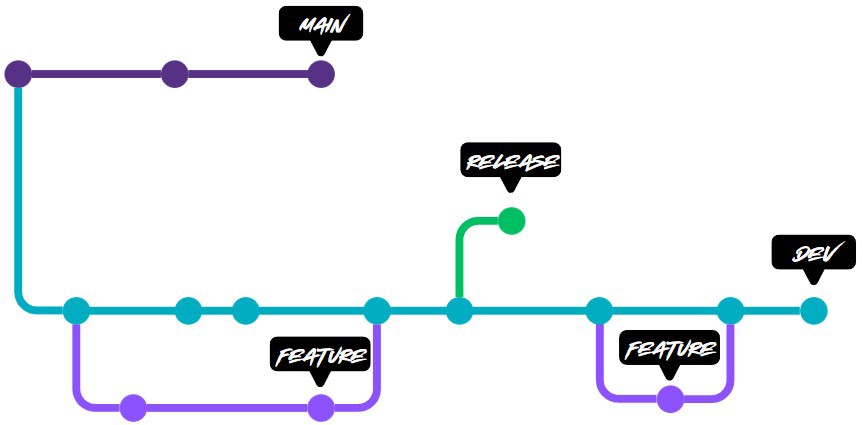
The release process consists of several steps. The first is to deploy to pre production environments (also called Staging or UAT). In the vast majority of companies you will be able to deploy to the development/test environment from the development branch or even from a feature branch. But for pre production you usually need a release.
So the first step is to deploy to pre production and run the necessary tests to make sure everything works fine.
If something fails we can make changes directly on the release branch, but it is important to then reapply them to the development branch.
When everything works and you deploy to production, what you do is apply the changes to the main branch.
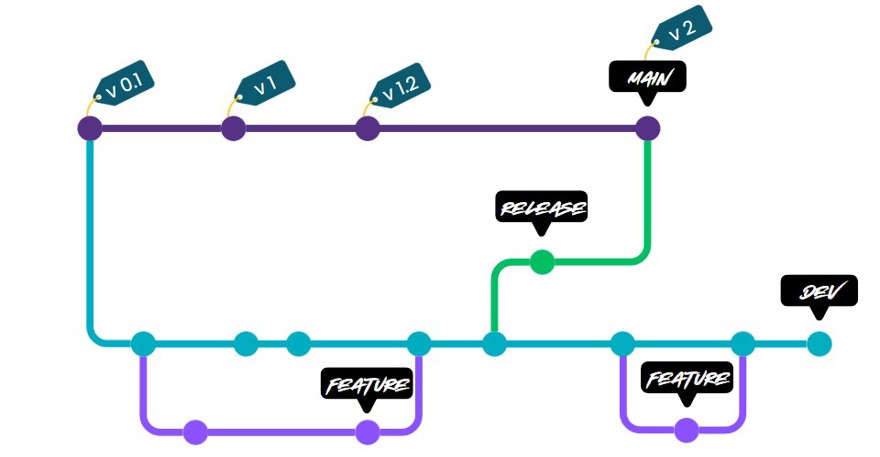
As you can see, we are also adding a label or a tag each time we merge into the release branch, we add a tag. This is done to identify the version number and some information about the change.
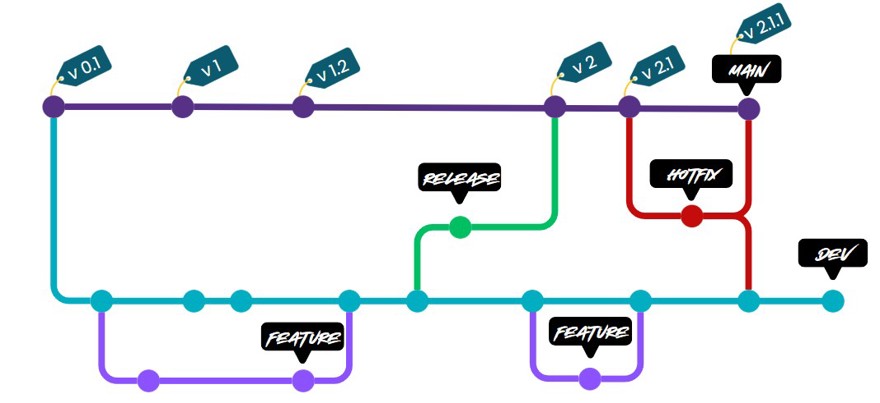
Finally, but no less important, when we work with Git Flow we have to make use of hotfixes. Some time ago I wrote a post about using hotfixes and how to do it directly in git, so I will link it. In short, it can happen that we have a bug in production that is urgent, and git flow is a fairly slow process, so what we do is create a branch called hotfix from main where we fix the bug and then reapply it both to main and to the development branch.
2 - GitHub flow
To be honest I had no idea this model was called GitHub flow, because whenever I have had to refer to it I have always described it instead of saying its name.
The key to this process is that every commit that is made has to be, or should be, ready to go to production.
Careful, this does not mean that team members work directly on main, no. It means that whenever there is a merge into main, that code can go to production without breaking anything.
In this model we have a main branch, main, and from there we create features which we must assume are deployed to production.
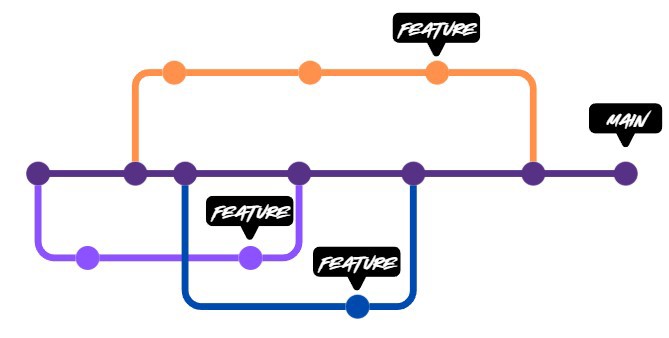
With this in mind, you might think that if a feature is large we will have problems because you will have parallel branches for a long time. But in reality that is not the case, because by implementing this workflow we also implement things like feature flags.
Another key point is that with this workflow we encourage team members to create small tasks that will trigger the pipeline. This means the code is continuously tested, enabling continuous integration and continuous deployment (CICD).
3 - Using Git Flow in 2025?
The big question is whether we should use Git Flow today. I will go straight to the point: until recently I had not worked with git flow for years and I thought it was completely eradicated from any project that was not legacy. But the reality is that it is not, companies still use this model because it makes sense.
What I mean is that in modern development of microservices and distributed systems pure gitFlow does not make sense and has no place. If you implement it you end up with a large number of steps to deploy very small features or tiny changes. But, as always, it depends on how you work with it. You can simply have a main branch where all your CI/CD runs from develop to pre production, and to go to production you need to merge into main.
This process can be automated or it can be manual, and it is a hybrid process where, if needed, we can create a hotfix.
Git Flow, even though it can be used, is not primarily designed for continuous delivery and continuous integration. It is designed for when an application is developed in a more waterfall like style. And to be fair, many applications and systems still work this way, especially if they are older than a certain number of years.
Another scenario where I find Git Flow very useful is when we have to support multiple versions. For example, client 1 is on version 3.5, client 5 is on version 2.9. In that context it is useful. But anyone who has worked in companies with such setups for enterprise customers knows that they become chaos very quickly. And of course, no SaaS product in the cloud can work with multiple versions.