As developers, most of us have run into issues with CORS or communication between components. In this post, I’ll explain what CORS is, how it works, and why it’s necessary to have CORS properly configured.
Table of Contents
1 - What is CORS?
CORS stands for Cross-Origin Resource Sharing, and it’s a browser security mechanism that allows a server to specify which origins are permitted to load resources.
These origins include the domain, protocol, and port.
This means that if we have an API exposed externally, we can configure it so the content of this API can be loaded from one of our web pages but not from a third-party website.
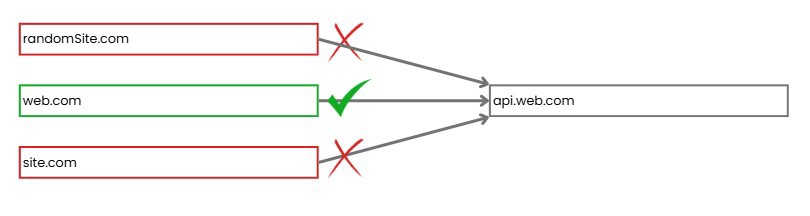
This configuration is defined on the API side and even affects subdomains. For the configuration shown in the image to work, we need to define on the API side that this domain is allowed to make HTTP requests.
Still, this is a browser security mechanism, so if you’re calling an API from outside a browser, these calls won’t be affected by CORS.
Such calls include software like Postman, Insomnia, or if you make HTTP requests from a programming language.
If you develop an API and it does not have CORS configured, the browser will check the same-origin policy, where both the site making the request and the one receiving it must be the same.
NOTE: CORS checks the Origin header. If you add it manually to the request, it will take effect.
2 - Why do we need CORS?
CORS is needed because the browser doesn’t implicitly trust sites to make requests to other sites. This policy isn’t to protect the requester, but to protect the server receiving the requests. That’s why the destination server decides which origins are allowed.
Without these restrictions, a simple script that repeatedly loads a page could be distributed via code injection, and any browser running this script could help perform a Denial of Service (DDoS) attack. Thanks to CORS (and the same-origin policy), the browser limits the impact of such scripts.
Another key protection CORS offers is against Cross-Site Request Forgery (CSRF). It prevents one site from making certain types of requests to another site using existing tokens like session cookies.
3 - CORS Preflight
If you’ve worked on systems where the front end is separate from the back end, you might have noticed that some front-end requests seem to be duplicated.
These requests aren’t actually being duplicated. What’s happening is that a preflight request is being triggered.
This is an additional request that the browser sends automatically for certain requests. For instance, with PUT or DELETE requests, the browser will first send an OPTIONS request to ask the server if the operation is allowed.
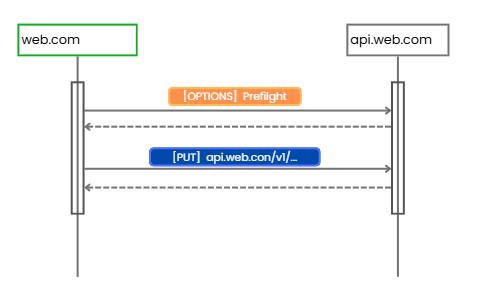
If the server’s response is not satisfactory, the browser will not make the actual request.
3.1 - Rules for Triggering a Preflight Request
Not all requests trigger a preflight. In fact, requests can be categorized as either simple requests or non-simple requests.
Simple requests don’t trigger a preflight and must meet the following criteria:
- If the request’s method is GET, HEAD, or POST.
- The request has no custom headers and uses only these: accept, accept-language, content-language, content-type*, and range.
For content-type, there’s a special case for POST: it qualifies as simple if it’s application/x-www-form-urlencoded, multipart/form-data, or text/plain. Any other content-type triggers a preflight.
Requests that don’t qualify as simple are those that don’t meet these rules.
- If the request uses PUT, DELETE, or any other method.
- You use custom headers like Authorization, token, etc.
- For POST requests, if the content-type isn’t one of the accepted ones.
If a preflight is triggered, the server will respond with the proper headers, as shown in the example, and a successful status code (200/204):
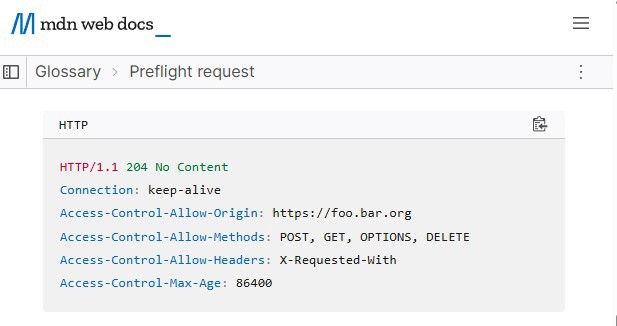
- Access-Control-Allow-Origin: Indicates which origins can make requests, it can be * to allow all.
- Access-Control-Allow-Methods: Available HTTP methods.
- Access-Control-Allow-Headers: Responds if the headers sent in the preflight request are valid.
- Access-Control-Allow-Credentials: True if cookies or Authorization headers are permitted.
- Access-Control-Max-Age: Informs the browser how long it can skip new preflight requests.
4 - CORS in .NET
Within .NET, or C# in particular, configuring CORS is super simple. If you have an API project, all you need to do is use the relevant extension method, which comes with the framework:
builder.Services.AddCors();
However, we aren’t specifying any options yet, so it does nothing, only allowing same-origin calls.
What we need to do is define the origins from which we want to allow responses.
To do so, we define a policy. In this policy, we indicate which origins, HTTP methods, and headers we want to allow in messages.
builder.Services.AddCors(options =>
{
    options.AddDefaultPolicy(policy => policy
        .AllowAnyOrigin()
        .AllowAnyHeader()
        .AllowAnyMethod());
});
In many cases, we allow any method and header because these are usually our own services that we trust. However, if you want to be more restrictive, you can specify which HTTP methods and headers to allow.
If you want to be even more restrictive, you can have multiple policies that you can then specify on the endpoints themselves.
builder.Services.AddCors(options =>
{
    options.AddPolicy("publicsite", policy => policy
        .WithOrigins("https://www.web.com")
        .AllowAnyHeader()
        .WithMethods("GET"));

    options.AddPolicy("adminsite", policy => policy
        .WithOrigins("https://admin.web.com")
        .WithHeaders("Content-Type", "Authorization")
        .AllowAnyMethod()
        .AllowCredentials());
});
After that, you need to use Cors in your WebApplication to have a global CORS policy.
app.UseCors();
Or as mentioned above, it can be applied per endpoint:
app.MapPost("/admin", () =>
{
//Logic here
}).RequireCors("adminsite");
Regarding preflight requests, in ASP.NET there’s nothing else to configure: if an endpoint exists and you use `UseCors`, preflight requests will work automatically. Still, if you wish, you can intercept these calls in a middleware.