A couple of weeks ago, the .NET team released preview 1 of what will become .NET 11, and it comes with a change that could mean a huge leap in quality for the .NET ecosystem, since they plan to change the way async/await works under the hood. Link to the Microsoft blog (https://devblogs.microsoft.com/dotnet/dotnet-11-preview-1/).
Table of contents
1 - What is Runtime Async?
If you work in .NET, the most common thing is that you already know what async/await is and when to use it. Every time you need your code to continue its execution somewhere else, whether it is an external service, querying an API, or placing an item in a queue, we are going to be using async/await.
And this is how we have always worked (those of you who have been around longer, since C# 5): when you write async, the compiler does all the work for us, and what it does is generate a state machine that indicates where we are in the method, the local variables, and what happens when the await completes.
This is what a decompiled piece of code that contains async/await looks like:
C# code:
private async Task> ValidateFlag(string flagName)
{
    bool flagExist = await applicationDbContext.Flags
        .Where(a => a.Name.Equals(flagName, StringComparison.InvariantCultureIgnoreCase))
        .AnyAsync();

    if (flagExist)
    {
        return Result.Failure("Flag Name Already Exist");
    }
    return flagName;
}
Compiled:
[AsyncStateMachine(typeof (AddFlagUseCase.d__4))]
[DebuggerStepThrough]
[return: Nullable(new byte[] {1, 0, 1})]
private Task> ValidateFlag(string flagName)
{
  AddFlagUseCase.d__4 stateMachine = new AddFlagUseCase.d__4();
  stateMachine.<>t__builder = AsyncTaskMethodBuilder>.Create();
  stateMachine.<>4__this = this;
  stateMachine.flagName = flagName;
  stateMachine.<>1__state = -1;
  stateMachine.<>t__builder.Startd__4>(ref stateMachine);
  return stateMachine.<>t__builder.Task;
}
In addition to the state machine:
[CompilerGenerated]
private sealed class d__4 :
/*[Nullable(0)]*/
IAsyncStateMachine
{
  public int <>1__state;
  [Nullable(new byte[] {0, 0, 1})]
  public AsyncTaskMethodBuilder> <>t__builder;
  [Nullable(0)]
  public string flagName;
  [Nullable(0)]
  public AddFlagUseCase <>4__this;
  [Nullable(0)]
  private AddFlagUseCase.<>c__DisplayClass4_0 <>8__1;
  private bool 5__2;
  private bool <>s__3;
  [Nullable(0)]
  private TaskAwaiter <>u__1;

  public d__4()
  {
    base..ctor();
  }

  void IAsyncStateMachine.MoveNext()
  {
    int num1 = this.<>1__state;
    Result result;
    try
    {
      TaskAwaiter awaiter;
      int num2;
      if (num1 != 0)
      {
        this.<>8__1 = new AddFlagUseCase.<>c__DisplayClass4_0();
        this.<>8__1.flagName = this.flagName;
        DbSet flags = this.<>4__this.P.Flags;
        ParameterExpression parameterExpression = Expression.Parameter(typeof (FlagEntity), "a");
        Expression> predicate = Expression.Lambda>((Expression) Expression.Call((Expression) Expression.Property((Expression) parameterExpression, (MethodInfo) MethodBase.GetMethodFromHandle(__methodref (FlagEntity.get_Name))), (MethodInfo) MethodBase.GetMethodFromHandle(__methodref (string.Equals)), new Expression[2]
        {
          (Expression) Expression.Field((Expression) Expression.Constant((object) this.<>8__1, typeof (AddFlagUseCase.<>c__DisplayClass4_0)), FieldInfo.GetFieldFromHandle(__fieldref (AddFlagUseCase.<>c__DisplayClass4_0.flagName))),
          (Expression) Expression.Constant((object) StringComparison.InvariantCultureIgnoreCase, typeof (StringComparison))
        }), new ParameterExpression[1]
        {
          parameterExpression
        });
        awaiter = flags.Where(predicate).AnyAsync(new CancellationToken()).GetAwaiter();
        if (!awaiter.IsCompleted)
        {
          this.<>1__state = num2 = 0;
          this.<>u__1 = awaiter;
          AddFlagUseCase.d__4 stateMachine = this;
          this.<>t__builder.AwaitUnsafeOnCompleted, AddFlagUseCase.d__4>(ref awaiter, ref stateMachine);
          return;
        }
      }
      else
      {
        awaiter = this.<>u__1;
        this.<>u__1 = new TaskAwaiter();
        this.<>1__state = num2 = -1;
      }
      this.<>s__3 = awaiter.GetResult();
      this.5__2 = this.<>s__3;
      if (this.5__2)
        result = Result.Failure("Flag Name Already Exist");
      else
        result = Result.op_Implicit(this.<>8__1.flagName);
    }
    catch (Exception ex)
    {
      this.<>1__state = -2;
      this.<>8__1 = (AddFlagUseCase.<>c__DisplayClass4_0) null;
      this.<>t__builder.SetException(ex);
      return;
    }
    this.<>1__state = -2;
    this.<>8__1 = (AddFlagUseCase.<>c__DisplayClass4_0) null;
    this.<>t__builder.SetResult(result);
  }

  [DebuggerHidden]
  void IAsyncStateMachine.SetStateMachine(IAsyncStateMachine stateMachine)
  {
  }
}
As you can see, it is not elegant code, but since the compiler does it for us and it is very fast, well, we let it slide.
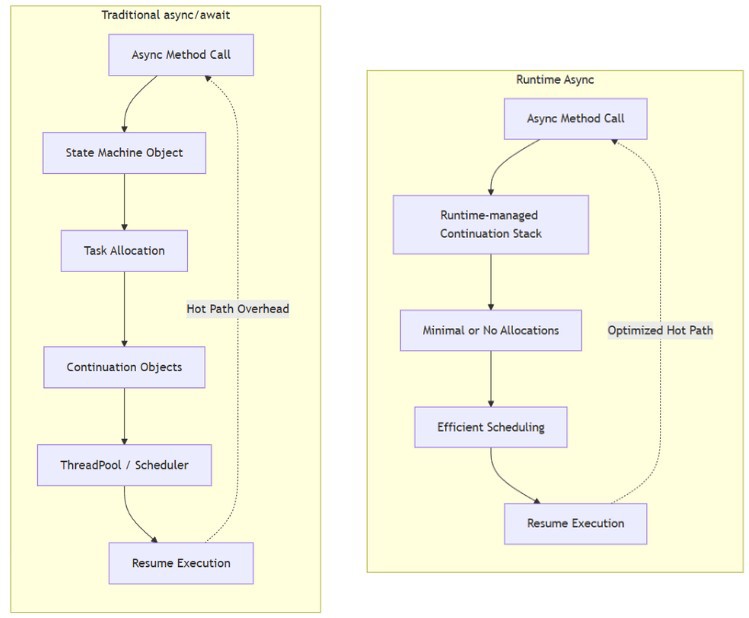
With Runtime Async we change this: instead of the compiler generating a state machine, the runtime itself is responsible for asynchronous execution, both through the JIT and through the execution engine.
And to enable it, we only need to use .NET 11 and enable the feature in the preview.
<PropertyGroup> <TargetFramework>net11.0</TargetFramework>... <EnablePreviewFeatures>true</EnablePreviewFeatures> <Features>$(Features);runtime-async=on</Features></PropertyGroup>NOTE: the preview part will not be necessary once it is released officially.
2 - What improvements can it bring?
The big question here is why this might matter to us normal developers. The answer, in a few words, is very simple: code improvements that are practically free.
But if we go a bit deeper, we have three main points:
A - Performance
Possibly the most important one in applications that have thousands of calls per minute. By generating the state machine, we end up placing objects mainly on the heap. Every async method that does not complete synchronously creates a Task object, a state machine, and very likely other objects, which, if we have thousands and thousands of calls per minute, you definitely feel it.
Recently (I think around 5 years ago) we learned to use ValueTask<T> instead of Task<T> to avoid allocations when the method completes synchronously, to use ConfigureAwait(false) in libraries, to cache Tasks for common results... All of these optimizations are still valid, but not everyone has the time or the need to squeeze every allocation out of their async code.
The idea behind Runtime Async is that the runtime works in a more efficient way, reducing memory allocations or even eliminating them completely. What is interesting here is that the difference between "manually optimized async code" and "just writing normal async/await" shrinks a lot, since the runtime does it for us.
B - Easier to debug
I assume that if you are reading this, it is because you are interested and you have spent a long time fighting with code, and you also know that C# is famous for having a huge stack trace. It gets even bigger when we work with async methods, and it becomes hard to navigate.
With the runtime being the one managing async natively, the debugging experience should improve as well.
C - Less IL code
Many of us take a look at the generated IL code from time to time to see how things work under the hood. This part is related to point 1, where we had a method and we saw that the compiler had generated the state machine for us.
This code is the same method in .NET 11 with Runtime async enabled:
[MethodImpl(MethodImplOptions.Async)]
[return: Nullable(new byte[] {1, 0})]
private Task> ADdFlagToDatabase(string flagName, bool isActive)
{
  FlagEntity entity = new FlagEntity();
  entity.Name = flagName;
  entity.UserId = this.P.UserId;
  entity.Value = isActive;
  AsyncHelpers.Await>(this.P.Flags.AddAsync(entity, new CancellationToken()));
  AsyncHelpers.Await(this.P.SaveChangesAsync(new CancellationToken()));
  return (Task>) Result.op_Implicit(true);
}
Less code is always better: the JIT will be faster, it will need less memory, and for those who use serverless, it will be much faster.
3 - When will we be able to use it?
This new feature is good news for practically all developers, since not everyone has time to optimize every process to the maximum, and this way the runtime does it for us, or well, the .NET team does it for us. Which is wonderful, and something to be thankful for, because it gives us all these advantages without affecting existing code.
That said, this is Preview 1, which means things can change and there may be bugs, edge cases that do not work, etc., but it is definitely an expected feature, since for a long time the community has been complaining about how async/await worked under the hood.
So when .NET 11 comes out in November, or maybe in .NET 12 with the LTS, I hope to have Runtime Async fully polished!