There are features that show up at every conference, you have hundreds of articles about them, and Twitter talks about them every day.
But then we have others that do not make as much noise and still improve our lives tremendously. Today we are going to talk about one of them: the use of Directory.Packages.props, Directory.Packages.props, and targets.
They are not recent features, well, from the last few years, and they are not cool within the new world of AI, but they make our day-to-day lives much easier, and today we are going to explore them.
Table of contents
1 - In .NET everything is multiple projects
When we create applications in .NET, no matter how small they are, we always like to separate everything into projects that split the different layers, and this is fine, but those projects always end up referencing libraries, whether they are ours, Microsoft's own, or third-party ones.
If we use as an example any of our repositories, each of the projects has a csproj, and these projects reference libraries. And no matter how much you keep them clean and try to keep everything well structured, at the very least you have to maintain the package versions.
This means that in many cases you end up with a collection of packages referenced across multiple layers of your application, where each project uses a version.
Maybe in the data layer you use EntityFramework version 10.0.1, in another layer you are using version 10.0.0, and in the tests it may even be version 9...
Now, IDEs have tried to improve the experience, and we have options to update all references at once.
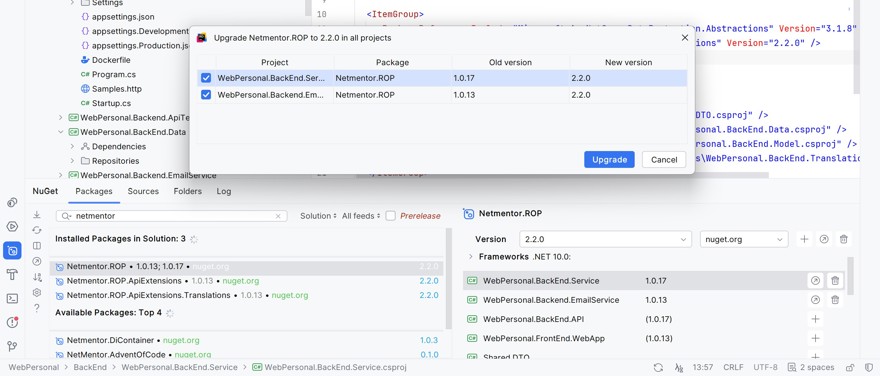
But we know that in practice, in large projects, this does not usually happen.
2 - Centralizing packages with Directory.Packages.Props
The problem we have just explained happens in every company, and in fact, in every language. It is not just your problem or mine, so Microsoft got to work and invested time in trying to solve this problem. And in my opinion, they have solved it.
Now, we have the possibility of defining a single file with the packages and versions we are going to implement. The Directory.Packages.Props file, and the feature is officially called Central Package Management. To enable it, simply create a file with that name at the root of the repo, next to the solution file (.sln)
<Project>

  <PropertyGroup>
    <ManagePackageVersionsCentrally>true</ManagePackageVersionsCentrally>
  </PropertyGroup>

  <ItemGroup>
    <PackageVersion Include="Dapper" Version="2.0.35" />
    <PackageVersion Include="Microsoft.AspNetCore.Components.WebAssembly" Version="3.2.1" />
    <PackageVersion Include="MySql.Data" Version="8.0.20" />
    <PackageVersion Include="Netmentor.ROP" Version="1.0.13" />
  </ItemGroup>

</Project>
The content of the file itself has no mystery. We have a PackageVersion for each library or package we have moved, as well as its version. Inside the file itself, we can group packages through the ItemGroup tag.
And now we simply need to reference them in the different projects of our application.
Careful, we are not going to reference the file directly. Instead, when we need to use a certain library, we will indicate it, but only for the library we want.
This is the example of the csproj from the data layer, where we only load the libraries we need:
  <ItemGroup>
    <PackageReference Include="Microsoft.AspNetCore.DataProtection.Abstractions" />
    <PackageReference Include="Microsoft.AspNetCore.Http.Abstractions" />
    <PackageReference Include="Netmentor.ROP" />
  </ItemGroup>
As we can see, we are not indicating the version, because the version is being defined in the other project.
What happens behind the scenes is that NuGet finds the first Directory.Packages.Props and imports the information into the project.
In the end, what this means is that we have changed from this:
  <ItemGroup>
    <PackageReference Include="Microsoft.AspNetCore.DataProtection.Abstractions" Version="3.1.8" />
    <PackageReference Include="Microsoft.AspNetCore.Http.Abstractions" Version="2.2.0" />
    <PackageReference Include="Netmentor.ROP" Version="1.0.13" />
  </ItemGroup>
To this other one:
  <ItemGroup>
    <PackageReference Include="Microsoft.AspNetCore.DataProtection.Abstractions" />
    <PackageReference Include="Microsoft.AspNetCore.Http.Abstractions" />
    <PackageReference Include="Netmentor.ROP" />
  </ItemGroup>
Where, despite being a small change, when you have a large application with 40 projects inside pointing to 10 different versions, it stops being a small change and becomes quite a big one.
Before finishing this point, to update a version, we simply have to modify the version in the file. But if for some reason you need to override the version in one specific project, you can also do it with versionOverride.
  <ItemGroup>
    <PackageReference Include="Microsoft.AspNetCore.DataProtection.Abstractions" />
    <PackageReference Include="Microsoft.AspNetCore.Http.Abstractions" />
    <PackageReference Include="Netmentor.ROP" versionOverride="2.2.0"/> <---- HERE
  </ItemGroup>
In any case, except for some specific scenario where, for example, you are migrating or something similar, I do not recommend overriding, because it defeats the purpose of using Packages.Props.
3 - Sharing the configuration of your .NET projects
The package topic is not the only thing we repeat in every project. We also do it with certain configuration, such as enabling nullable, marking warnings as errors. To eliminate all this repetition, we have the Directory.Build.props file, which works in the same way: a file at the root of the repository with the common information to have:
<Project>

  <PropertyGroup>
    <TargetFramework>net8.0</TargetFramework>
    <TreatWarningsAsErrors>true</TreatWarningsAsErrors>
    <Nullable>enable</Nullable>
  </PropertyGroup>

</Project>
Behind the scenes, what happens is that MsBuild automatically imports this file for projects in subfolders, which means we can remove a lot of content from a project's csproj, leaving only the packages to use:
<Project Sdk="Microsoft.NET.Sdk">

  <PropertyGroup>
    <RootNamespace>WebPersonal.BackEnd.Service</RootNamespace>
  </PropertyGroup>

  <ItemGroup>
    <PackageReference Include="Microsoft.AspNetCore.DataProtection.Abstractions" />
    <PackageReference Include="Microsoft.AspNetCore.Http.Abstractions" />
    <PackageReference Include="Netmentor.ROP" />
  </ItemGroup>

  <ItemGroup>
    <ProjectReference Include="..\..\..\Shared\Shared.DTO\Shared.DTO.csproj" />
    <ProjectReference Include="..\WebPersonal.BackEnd.Data\WebPersonal.BackEnd.Data.csproj" />
    <ProjectReference Include="..\WebPersonal.BackEnd.Model\WebPersonal.BackEnd.Model.csproj" />
    <ProjectReference Include="..\WebPersonal.BackEnd.Translations\WebPersonal.BackEnd.Translations.csproj" />
  </ItemGroup>

</Project>
As before, if you want to override, you can do it either in the csproj itself or even by creating another directory.Build.Props with a different configuration in a subfolder.
3.1 - Common actions in .NET projects
When you work with MsBuild in .NET, we have a block called Target. This block runs tasks or scripts that let you customize the build process, execution, etc.
These configurations can also be placed in a Directory.Build.Targets file, which will be common to all projects:
<Project>
   <Target Name="PreventDebugPackage" BeforeTargets="Pack" Condition="'$(Configuration)' == 'Debug'">
      <Error Text="Packages must be generated using release" />
   </Target>
</Project>
This may be less common, since they are usually very specific actions in specific cases, so it does not always make sense to add them all to every project in a solution.
4 - Conclusion
It is obvious that the goal is to simplify. AI is simplifying development, and anything that comes out to make life easier and reduce token cost is welcome.
Especially both Directory.Pacakges.Props and Directory.Build.Props, I think they should be used in every solution, because we all have a bunch of shared properties and libraries. At first it may not seem like a big deal, but once you get used to it, there is no going back.

Comments