Well, I've had my Razer Blade for about two months now and, to be honest, I’m very happy with it. I wasn’t going to write a review since there are several online already and, in general terms, they're very positive. But those reviews never mention any negatives. Of course, what are they going to say if they’re lent the laptop for two days and have to get their video approved? Anyway, let’s get to it.
1- First Impressions
The first impression is that it’s a beautiful laptop. When you take it out of the box you’re impressed, that’s just how it is. I love the color combination; the green with the metallic black is perfect. Even the box itself is quite stylish, and then the laptop comes in a box inside the main box, which is great as it helps protect it from knocks or accidental damage.
I'm not going to go into more detail about the box, because if you're buying a laptop for the box, you’re watching the wrong video.
2 - Laptop Details
The laptop itself is a beast. My model is the Razer Blade 15 Advanced Model 2019 - https://amzn.to/2YpJAau
It comes with Windows Home 64-bit pre-installed.
- I7-8750h with 6 cores
- Monster graphics card, NVIDIA GeForce RTX 2080 Max-Q (8GB GDDR6 VRAM)
- 15.6 inch Full HD 144Hz display
- 16GB DDR4 RAM, upgradeable to 32. (Honestly, it should come with 32 by default for the price)
- 512GB SSD, again, for what it costs, it should come with at least 1TB
- 720p webcam, pretty poor.
- 3 USB 3.1 ports
- USB-C (Thunderbolt 3)
- No Ethernet or card reader, so you’ll need adapters.
- 2.1kg weight
- Actual battery life is 5 hours, forget about the 6 (or 8 as some claim). With brightness at minimum, maybe it hits 6, but in normal use, impossible.
3 - Pros and Cons
In this section, I’ll highlight the cons, because this laptop is objectively the best on the market, it’s an enviable beast. So let me break things down a bit.
A - Design
Pros
- The design is awesome, the laptop truly looks fantastic, it’s ultra-thin and very light.
- The fans are barely noticeable, which is impressive, because with the Aero 15 X they’re always going off.
- Temperature is also key, it rarely gets hot, during office work, programming, etc., it really doesn’t heat up at all. In other use cases like gaming or video editing you can feel it get warmer, maybe around 60-70 degrees, but it’s a laptop, it will get warm no matter what.
Cons
- The metallic black finish, though it looks beautiful, shows every single fingerprint, and once they’re on, they’re almost impossible to remove. You’ll fill it with fingerprints before ever removing one, it’s terrible.
- The charger, I’m coming from a MacBook Pro, and you have to hand it to Apple, their charger design is top notch. The Razer Blade's charger leaves a lot to be desired. I didn’t expect MagSafe, but at least something better. It has two main negatives:
- It's really hard to plug in and out
- The connector is aluminum, the laptop is aluminum, it leaves marks, there’s no way around it.
- At first, I thought this would be a more serious issue: when you close the laptop, the aluminum in the screen bends a little, so it seems there’s a gap.

Design gets an 8 out of 10 from me, despite the bulge issue. In the end, it’s not something that really bothers me.
B – Keyboard
Pros
- How the keys feel when typing is amazing, personally, it’s the perfect balance, soft but not too soft.
- Every key is customizable; the keyboard is per-key RGB, meaning you can set any color you want for each key. I keep them all green, and it looks great.
Cons
- The right shift key is shifted one position to the right to make room for the arrow keys. Right now it’s not an issue, but during the first days it was a nightmare, every time I wanted to type an uppercase letter, I would hit the up arrow instead.
- The second con is not really a downside, since it's mentioned on the product page when you buy it: on the keyboard, if a key has two symbols, for example, 8 and *, only the main value is illuminated. If you always work at a desk or in an office it’s not a big deal, but I tend to use it on the couch, and I have to keep checking which button is volume or pause.
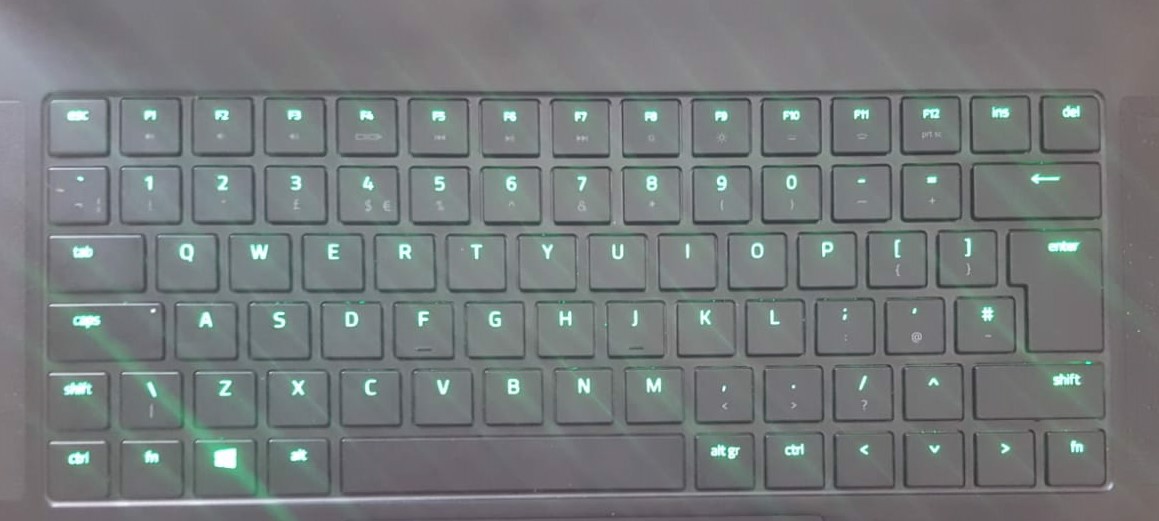
Keyboard score: 9.5/10
C - Audio and Video
Pros
- Audio is good, the speakers work well, there are two located on the sides of the laptop.
- The screen works perfectly, a great variety of colors and very bright. For me, the screen is perfect.
Cons
- The webcam. It’s honestly terrible, and it’s really disappointing to me because I had planned on shooting all my videos with this camera. That doesn’t seem possible now. When I started filming, I used it and immediately had to switch because, wow. This is a 3000€ laptop, it should have at least a 1080 camera, even a 2015 smartphone had that.
Score: 8/10
D – TrackPad
Pros
- No complaints here, it works perfectly, responds to up to 3 points at once, so you can switch windows with it instead of using alt-tab.
- It’s also big, which makes it even easier to use.
10/10
E – Performance
Pros
- It’s all pros here. The performance is spectacular. For my regular use, which is programming, it’s a 10/10, it's a beast. I edited a short video, and it ran even better than my desktop, zero complaints.
- As for gaming, I tried Battlefield V, and you can play everything on Ultra at a constant 60fps, sometimes even 70, but only occasionally.
10/10
4 – Configuration
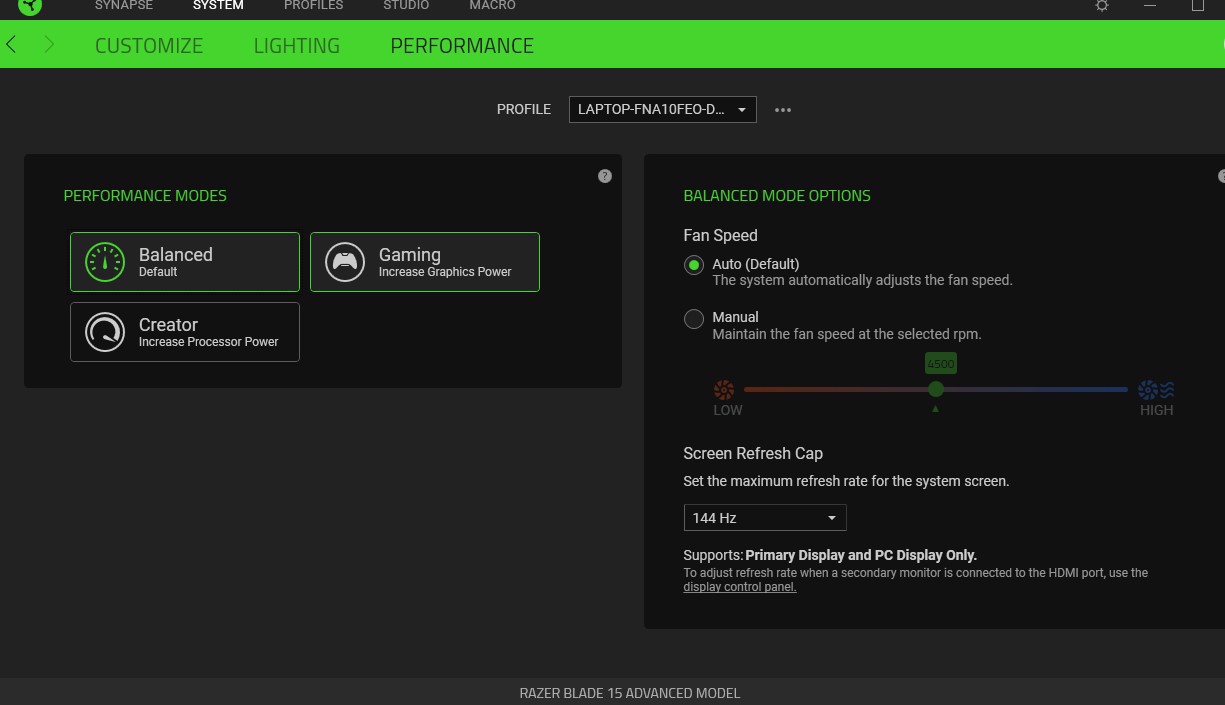
Razer includes its own configuration system, which provides three different modes: Balanced, Gaming, and Creation, each aimed at the appropriate use case.
5 - Where to Buy
Where to buy it? I highly recommend buying it on Amazon, mainly for the support they provide. I've read many complaints about Razer's direct support, so if we can avoid it, much better.
Razer Blade 15 2018 Max-Q https://amzn.to/2Yp45jj
In addition, it's possible Razer doesn’t ship to your country.
Other links from the post
ethernet adapter - https://amzn.to/2YlnvWg
Gigabyte Aero 15 X - https://amzn.to/2MhOMXA
Razer Blade 17 RTX 2070 - https://amzn.to/2JWrS6o
Razer Blade 15 RTX 2070 - https://amzn.to/2SJik1b
USB-C card reader - https://amzn.to/2T3Gxjj

Comments